
Table of Contents
Key Takeaways
- Self-service works best when it removes simple friction without eliminating staff support.
- Check-in should be clear, private, accessible, and easy to correct.
- Telehealth planning must cover the full workflow, not only the video visit.
- Accessibility, privacy, system integration, and downtime procedures should be built in from the start.
- Small pilots and patient feedback help organizations find barriers before expanding a program.
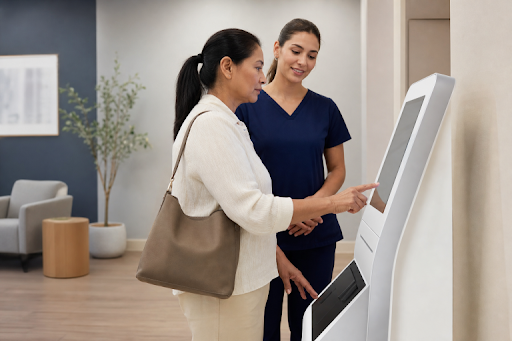
Self-service tools can make check-in, intake, payments, and virtual care easier for patients, but only when the experience is designed around people rather than devices. Well-planned kiosks for Healthcare facilities can reduce routine delays while still giving patients a clear path to human assistance when they need it.
The goal is not to replace every front-desk conversation. It is to give patients convenient choices, protect their privacy, and help staff spend more time on questions that require judgment, empathy, and personal support.
Why Self-Service Care Needs a Human-Centered Plan
Digital tools can help patients confirm appointments, update contact details, complete forms, make payments, or join a remote visit. However, a confusing screen, a long intake form, or an unclear error message can create stress at a moment when patients may already feel unwell or anxious.
A human-centered approach recognizes that patients have different levels of technology experience, language needs, mobility limitations, and comfort with sharing information digitally. For example, an older adult may be able to complete a simple check-in independently but still need a nearby staff member to answer a question about insurance or help restart a paused session.
Map the Patient Journey Before Choosing Technology
Healthcare organizations should review the complete patient journey before selecting hardware or software. A quick arrival process does not improve the experience if the patient must repeat the same information at the desk or wait for staff to manually re-enter a completed form.
- Appointment scheduling and reminders
- Arrival, identity confirmation, and check-in
- Insurance, demographic, and contact updates
- Consent, health history, and intake forms
- Payment or financial-assistance requests
- Room assignment or connection to a virtual visit
- After-visit instructions and follow-up scheduling
At each step, identify what the patient sees, what information is needed, where that information goes, and when staff must intervene. This mapping process prevents disconnected workflows that create duplicate records or missed handoffs.
Build a Clear and Simple Check-In Experience
Check-in screens should use plain language, short instructions, and one primary task at a time. Patients should see their progress, be able to pause and resume, and have an obvious way to review or correct details before submitting information.
Patient Intake Review Checklist
- Can a first-time user begin without extensive staff instruction?
- Can a patient fix an error without restarting the process?
- Are private details shielded from nearby visitors?
- Is help available through a visible button, prompt, or staff member?
- Does the system clearly confirm that information was saved?
- Are language options available for the communities the organization serves?
Completion instructions matter, too. Patients should know whether to sit down, wait for a text message, speak with staff, proceed to a room, or join a virtual care session.
Connect Self-Service Check-In With Telehealth
Self-service can support telehealth in a clinic, community site, pharmacy, or other care setting. A video appointment connects a patient and clinician remotely. A virtual check-in handles administrative or intake steps before that visit. Remote monitoring collects health information outside the visit, often from home devices or patient-reported data.
Organizations should plan for scheduling, consent, identity verification, triage, documentation, billing, technical troubleshooting, and follow-up. Federal telehealth workflow guidance notes that telehealth can affect scheduling, check-in, appointment structure, triage, consent, and documentation, not just the video connection itself.
Design for Accessibility From the Start
Accessibility should guide device placement, screen height, reach range, font size, color contrast, lighting, audio, captions, navigation, and staff support. Equipment should be on an accessible route and positioned so it does not block walkways or force patients to use it in a crowded area.
- Use readable text, strong contrast, and simple navigation.
- Support captions, audio prompts, screen readers, and alternate input methods where applicable.
- Provide seating or staff assistance for patients who cannot comfortably stand through intake.
- Offer help discreetly, without requiring a patient to discuss personal information in public.
Digital access is also a civil-rights consideration. Patients with disabilities must have an equal opportunity to participate in telehealth, which can require effective communication and reasonable adjustments to normal practices.
Protect Privacy in Shared Spaces
Privacy extends beyond passwords and network security. A screen visible from a waiting-room line, a loud audio prompt, a printed receipt, or a staff conversation overheard by others can expose sensitive information.
Place devices away from queues, use privacy filters when appropriate, limit information displayed on screen, clear session data after each use, and train staff to offer assistance quietly. Patients should also understand what information is being collected and why it is needed.
Plan for Integration, Staff Support, and Downtime
Self-service tools should connect reliably with scheduling, electronic health records, billing, payment, and patient communication systems. Strong integration reduces repeated data entry, helps prevent mismatched records, routes forms to the appropriate team, and keeps appointment details aligned.
A blended model remains essential. Staff should be available during busy periods, alternatives should be clearly offered to patients who prefer not to use a device, and teams should track the help requests they receive most often. Organizations also need a downtime plan that includes staff-assisted or paper check-in, clear signage, technical alerts, and a process for entering information after systems are restored.
Test and Measure What Matters
Begin with a small pilot involving patients of different ages, languages, mobility needs, technology experience, and health literacy levels. Observe where people pause, make errors, abandon a session, or request assistance. Ask both patients and staff what felt easy, confusing, or uncomfortable, then address the largest barriers before expanding.
Useful measures include average check-in time, form completion rate, abandoned sessions, staff-assistance requests, appointment delays caused by intake issues, duplicate records, accessibility complaints, and patient feedback. Speed alone is not success. A fast process that creates errors or leaves patients frustrated can create more work later.
Common Questions
Will self-service tools replace front-desk staff?
No. The strongest model uses digital tools for routine tasks while keeping staff available for exceptions, clinical questions, accessibility needs, translation, and personal support.
Are self-service systems useful for older adults?
They can be when navigation is simple, text is readable, instructions are clear, and assistance is easy to request. Testing with older patients before launch helps identify avoidable barriers.
How can a clinic improve adoption?
Use clear signs, appointment reminders, short multilingual instructions, staff demonstrations, and a gradual rollout that gives patients time to become familiar with the process.
Conclusion
Patient-friendly self-service care is not defined by the newest device or the shortest line. It is defined by whether the full experience works for real people. Clear design, accessible options, privacy protections, dependable integration, and visible human support can help healthcare organizations make care easier to access without making patients feel left on their own.